Mobile app development
Building a mobile app means choosing an approach, testing on real phones and getting through store release, and each step is easier with a plan.
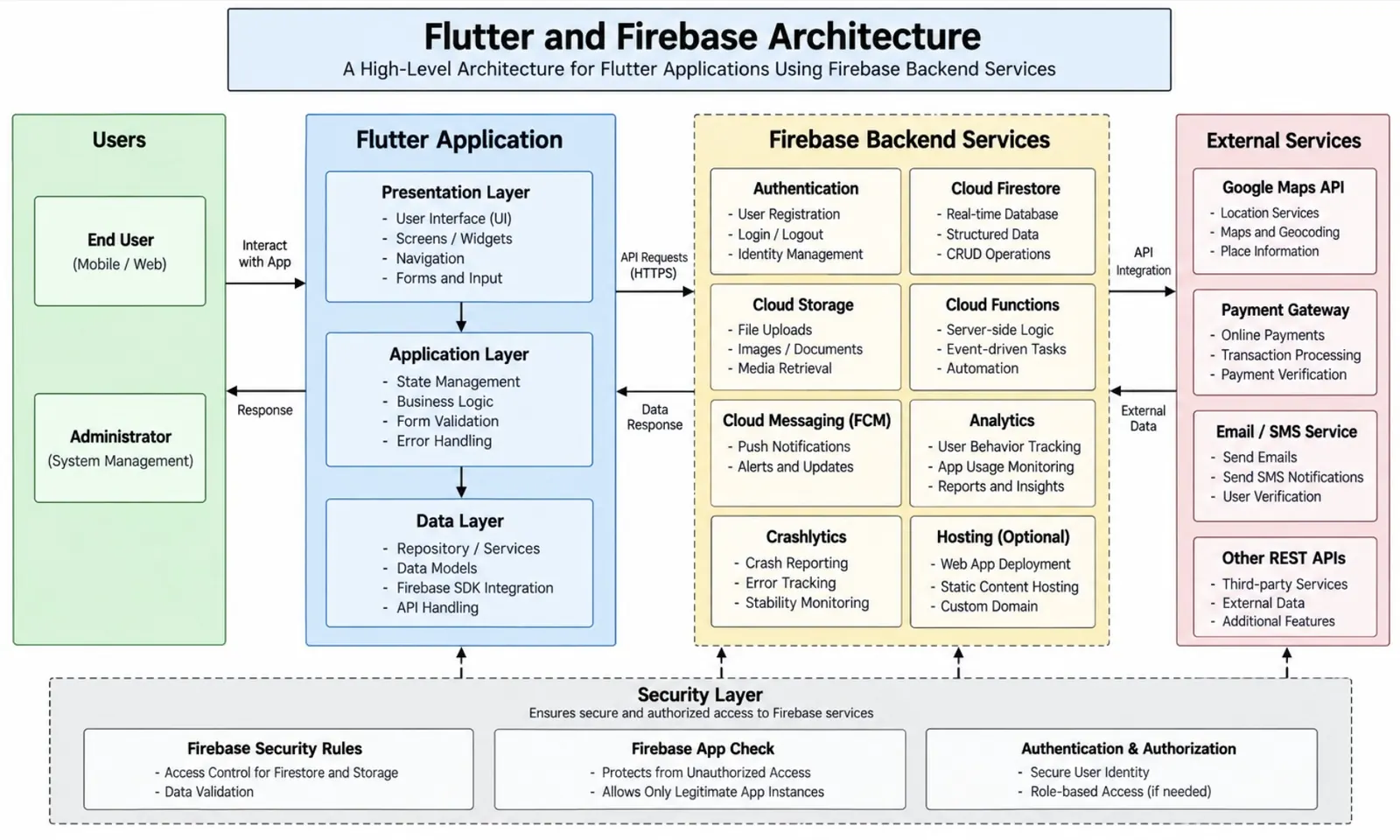
A good mobile app starts with a few honest decisions: who will use it, which devices they carry, and what the app must do offline, in the background or with the camera and location. This page walks through the choices that shape the work, from the first technical approach to the day the app appears in a store.
Native or cross-platform?
There are two broad ways to build for iOS and Android.
Native development
Native apps are written separately for each platform, usually in Swift for iOS and Kotlin for Android. They get the most direct access to system features and tend to feel the most at home on each device.
- Best for graphics-heavy apps, complex animation or deep use of device hardware.
- Needs two codebases, so it takes more effort to keep both in step.
Cross-platform development
Frameworks such as Flutter and React Native let one team share most of the code between both platforms. Much of the interface and business logic is written once.
- Best for content, forms, accounts, dashboards and many everyday business apps.
- Occasionally needs a small piece of native code for a specific feature.
Neither choice is always right. If the app is mostly screens, data and network calls, cross-platform is often a sensible start. If it leans on the hardware, native deserves a closer look. Our project briefing guide helps you gather the details that settle this question.
Backend and APIs
Most apps rely on a server for accounts, data storage and notifications. Planning the API early keeps the mobile and server work from blocking each other. The same team can handle both sides, or the app can plug into a web application you already have.
Testing on real devices
Simulators are useful for quick checks, but they do not show everything. Real phones reveal how an app behaves with a weak connection, a low battery, an interrupted call or an older operating system version.
- Test on a mix of screen sizes and OS versions that match your audience.
- Try flight mode, slow networks and switching between apps.
- Check permission prompts, such as notifications and location, in both the allowed and denied cases.
- Repeat key journeys after each release candidate.
Our QA testing work covers this kind of device-based checking alongside automated tests.
Getting into the stores
Apps are released through Apple's App Store and Google Play. Each has its own account setup, review process and listing requirements.
- Prepare accounts: create developer accounts for each store well ahead of launch.
- Build the listing: write a clear description, and prepare screenshots, an icon and a privacy policy link.
- Create a release build: sign the app and upload it through each store's tools.
- Test with a small group: TestFlight on iOS and testing tracks on Google Play let a few users try the build first.
- Submit for review: allow time for questions or changes from the reviewers.
- Release in stages: a gradual rollout makes it easier to catch problems early.
After launch
New phone models and OS updates arrive every year, so apps need regular attention. Crash reports, small fixes and dependency updates keep things steady. See maintenance and support for how that ongoing work is usually organised.
Working with a remote team
Mobile projects suit distributed teams well when builds are shared often and feedback is quick. Read about how we work, or get in touch to talk through your app idea.